This Folder gives review and database administrators the ability to see and manage documents in many different foldering structures, dependent on the metadata connected with the documents or the criteria used to collect them. The illustration below has been expanded to show standard first-level subfolders for each top-level Admin View.
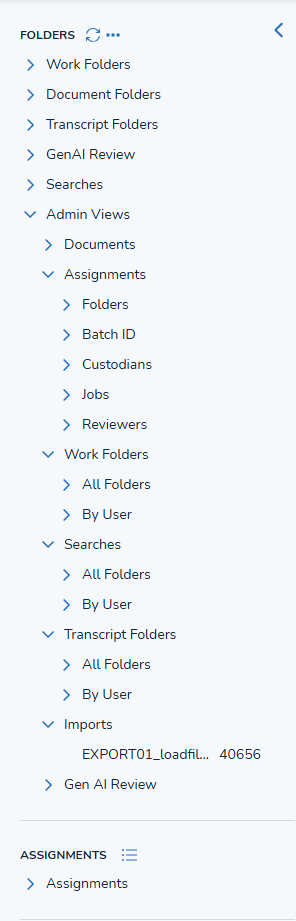
Documents - View all load batches and their sub-folders; for example, see a Custodian's PST with privileged and non-privileged and personal folders within.
Assignments - View assigned batches by:
Folder,
Batch,
Custodian (within the current assignments),
Job,
Reviewer, or
Thread.
Under the Folder and Reviewer subfolders you may examine the Reviewed and Not Reviewed batch subfolders with counts (if no searches are active); admins also have the option to click on the option menu […] at the right of a folder label and delete a batch folder or assignment set.
Work Folders - Examine, add, modify access to or lock down any work folder, or examine those accessible by each user.
Searches - View all saved searches or those under each user, including the ability to see the search syntax in the Saved Search modal and to modify access to use the search.
Transcript Folders - Transcripts to be reviewed are organized in this folder. Once loaded, transcripts can be opened like documents and tagged into a Transcript Folder.
Imports - All data sets uploaded into Reveal may be viewed here.
Gen AI Review - View all AI-generated content.