Privilege review is often performed at the family level. An email may be tagged Privilege while one or more attachments are not, creating inconsistent coding and increasing the risk of inadvertent production. Including families in a saved search helps surface these discrepancies for quality control.
So you might want to identify document families where at least one document is tagged Privilege, but other family members may have been missed and remain untagged.
Video Tutorial
00:15: Privilege review is usually done at the family level.
00:17: What we're looking for are families where one document is tagged privilege, but
00:22: other family members may have been missed and left untagged. That's the
00:26: inconsistency
00:27: we're going to surface.
00:29: First, click into the search bar and type tags privilege.
00:34: Click search.
00:36: Now we'll save this search as a locked search and tell it to pull in the full
00:39: family,
00:39: parents, attachments, everything related.
00:43: In "Save", name the search.
00:45: Check the box for "Lock This Search" and "Include Families" and then "Save Search".
00:52: Then in saved searches, you can find your locked search and click run search.
00:58: Before we dig into the results, we can customize the table view so we can see family
01:03: relationships at a glance.
01:07: This gives a better view of the document and family relationships
01:10: you're working on without having to open the viewer first.
01:14: In customized columns, you can select things like tags, family status, and family
01:18: count. Then click Save and close.
01:23: Now we'll exclude the documents already tagged privilege,
01:26: so we're only looking at the family members that might have been missed.
01:29: Click back into the search bar, still within the saved family results,
01:35: and add not tags privilege,
01:37: then click search.
01:38: One thing to watch for here is if multiple reviewers are working on this project,
01:41: one of them may have called documents that are part of a partial family without
01:46: realizing it.
01:47: That can hide related documents under the cold view.
01:50: It's worth checking for that.
01:52: Before we finalize anything you can do that by going to the document view filter and
01:56: check
01:57: Called to see if any documents have been called that belong to a family.
02:00: We are reviewing.
02:06: For each result will open it in the viewer and decide whether it should inherit the
02:10: privilege tag or whether the current tagging is actually correct.
02:15: Click a document in the results list to open Document Viewer.
02:19: Check the Family Tree Relationship panel to see how it relates to the tagged
02:23: privilege document.
02:25: Click the Tags panel.
02:27: Either check Privilege to apply it or leave as is if the existing tagging is
02:32: correct.
02:33: Click next to repeat this process with the rest of the documents.
02:37: Last step, after making corrections we always re-run the saved search to confirm
02:41: every member of a privileged family is coded consistently before it goes to
02:45: production.
02:49: Finally, confirm the exclusion filter
02:51: not tags privilege returns
02:53: no unresolved results.
02:55: That's the full workflow for catching privilege
02:57: tagging inconsistencies at the family level.
03:00: The same steps
03:00: apply if you're auditing confidential, responsive, or any other tag.
00:15: Privilege review is usually done at the family level.
00:17: What we're looking for are families where one document is tagged privilege, but
00:22: other family members may have been missed and left untagged. That's the
00:26: inconsistency
00:27: we're going to surface.
00:29: First, click into the search bar and type tags privilege.
00:34: Click search.
00:36: Now we'll save this search as a locked search and tell it to pull in the full
00:39: family,
00:39: parents, attachments, everything related.
00:43: In "Save", name the search.
00:45: Check the box for "Lock This Search" and "Include Families" and then "Save Search".
00:52: Then in saved searches, you can find your locked search and click run search.
00:58: Before we dig into the results, we can customize the table view so we can see family
01:03: relationships at a glance.
01:07: This gives a better view of the document and family relationships
01:10: you're working on without having to open the viewer first.
01:14: In customized columns, you can select things like tags, family status, and family
01:18: count. Then click Save and close.
01:23: Now we'll exclude the documents already tagged privilege,
01:26: so we're only looking at the family members that might have been missed.
01:29: Click back into the search bar, still within the saved family results,
01:35: and add not tags privilege,
01:37: then click search.
01:38: One thing to watch for here is if multiple reviewers are working on this project,
01:41: one of them may have called documents that are part of a partial family without
01:46: realizing it.
01:47: That can hide related documents under the cold view.
01:50: It's worth checking for that.
01:52: Before we finalize anything you can do that by going to the document view filter and
01:56: check
01:57: Called to see if any documents have been called that belong to a family.
02:00: We are reviewing.
02:06: For each result will open it in the viewer and decide whether it should inherit the
02:10: privilege tag or whether the current tagging is actually correct.
02:15: Click a document in the results list to open Document Viewer.
02:19: Check the Family Tree Relationship panel to see how it relates to the tagged
02:23: privilege document.
02:25: Click the Tags panel.
02:27: Either check Privilege to apply it or leave as is if the existing tagging is
02:32: correct.
02:33: Click next to repeat this process with the rest of the documents.
02:37: Last step, after making corrections we always re-run the saved search to confirm
02:41: every member of a privileged family is coded consistently before it goes to
02:45: production.
02:49: Finally, confirm the exclusion filter
02:51: not tags privilege returns
02:53: no unresolved results.
02:55: That's the full workflow for catching privilege
02:57: tagging inconsistencies at the family level.
03:00: The same steps
03:00: apply if you're auditing confidential, responsive, or any other tag.
Instructions
Find all documents tagged Privilege. You can either:
Plug tags:Privilege into the search bar.
Configure the AdvancedSearch Builder dropdowns to IS – Tags –EQUALS – Privilege.
Save the results as a locked saved search and select Include Families to pull in all related parent and child documents.
Run your saved search.
Apply a tag exclusion filter or search for documents within the family set that are NOT tagged Privilege. This further narrows your document set so you’re not looking through those already marked privileged. You can either:
Plug NOT tags:Privilege into the search bar.
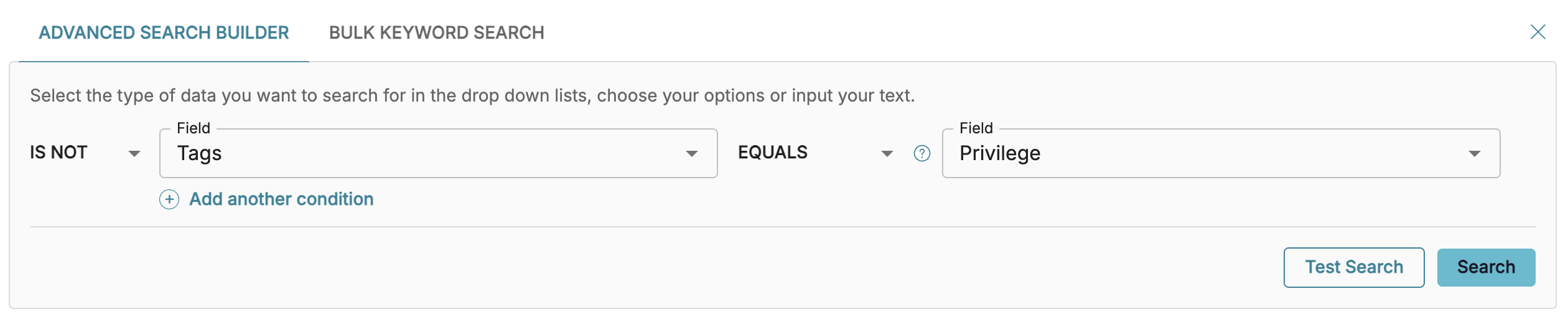
Configure the AdvancedSearch Builder dropdowns to IS NOT – Tags –EQUALS – Privilege.
In Document Viewer, validate whether the untagged family members should inherit the Privilege designation or whether the existing tagging is correct.
Important
After correcting any inconsistencies, rerun the search to confirm that all members of privileged families have been coded consistently before production.
Troubleshooting
Why do my search results disappear while tagging?
This is a potential behavior that can happen during QC review of documents not tagged as Privileged. Logikcull tends to automatically refresh the search results when a user tags a document as Privileged, removing that document from the search results because it no longer meets the search criteria.
Workaround: To prevent documents from disappearing during review, users can temporarily save a new search containing the NOT tags:Privilege search results, effectively preserving a static set of documents for QC regardless of subsequent privilege tagging.
.png)

.png)