Ask AI is available as a premium feature based on your subscription plan. To enable Ask for your account or specific projects, contact support@revealdata.com or reach out to your Customer Success Manager (CSM). They will review your request and complete the activation process.
After Ask has been turned on by your CSM, you’ll need to activate Ask within Logikcull’s account-level or project-level preferences. Depending on the project, you may need to reach out to your CSM to request reindexing of your documents.
Regional implementation
Ask can be enabled in any geographic region supported by LGK. Typically, it operates within the same AWS region as the project instance. Exceptions may exist for certain regions. Contact your CSM to review your Data Processing Agreement and confirm if any regional considerations apply.
Activate Ask
You can activate Ask at either the account level or at the project level. This lets you control whether or not Ask is being used across your entire account, or just select projects.
Note
Project-level access to Ask is available to Basic Users and above. Users with the Reviewer or Limited Reviewer roles currently do not have access to Ask.
Account level
With Account Admin permissions.
Navigate to My Accounts > Preferences and scroll down to the Upload Preferences section.
.png)
In the Ask AI Project Setting Default dropdown, choose On. This will have Ask turned on by default whenever you create a new project.
Click Save Upload Preferences.
Project level
During project creation
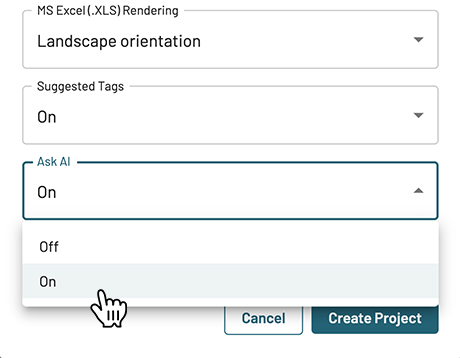
When creating a project, under More options and processing defaults, you can use the Ask AI dropdown to set the feature on or off for your project, even if you set Ask to “On” by default.
After project creation
To turn on Ask for a project that has already been created:
Navigate to your project settings, then Preferences, and scroll down to the Upload Preferences section.
.png)
In the Ask AI dropdown, choose On.
Click Save Upload Preferences.
Note
Once you’ve uploaded documents to a project, the Ask AI dropdown will permanently set to your choice, grey out, and cannot be changed.
Ask AI reindexing
If you enabled Ask for a project or account after documents have been uploaded, email your CSM or support engineer, who will get the process started on reindexing your data. You will need to provide them with every project that needs reindexing for Ask.
When an Ask AI reindexing job is in progress, your projects will remain fully accessible. You can still perform searches and review documents without interruption.
Important
It’s recommended to avoid uploading new documents while the reindexing process is running. Documents upload during this period may not be included in the already-running index, which could require a subsequent reindex to be searchable using Ask AI.