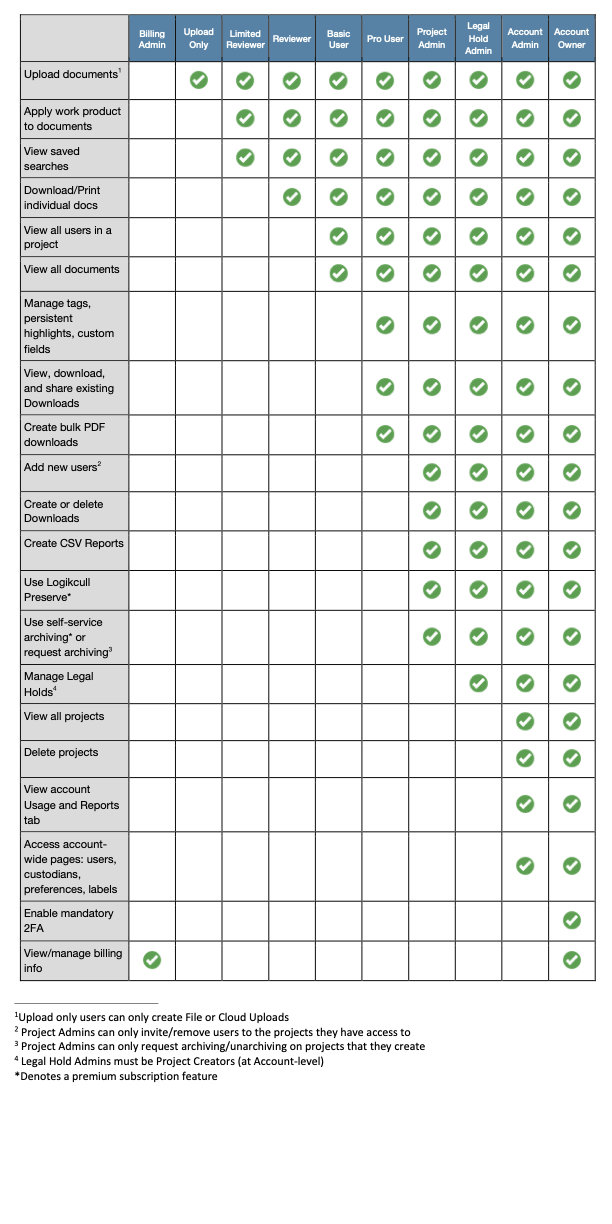
Logikcull permissions are determined through user types and access levels. Each user must be assigned a user type, and when giving a user access to a project, their access level is determined.
User Types
User types determine the permissions a user has at the account level. Each user is assigned one user type.
Limited User
Users who need access to existing projects.
Limited Users must be manually added to a project in order to obtain access.
Project Creator
Users who can create new projects.
Can create a new project in an account.
Automatically becomes a Project Admin in any project they create.
Cannot access projects they have not been granted access to.
Note
Project Creators do not have to be Project Admins for all of their accessible projects. You may assign a Project Creator any user access level.
Billing Admin
Users who only need access to manage and / or view billing information, with no access to any projects or documents.
Can see Billing tab under Account page.
Can download per-project-invoices and most recent billing statement.
Can update payment details and billing address.
Cannot access any other functionality outside of the Billing page.
Cannot view any documents within any projects.
Account Admin
Administrative users who can access all projects, delete projects, add or remove account-level users, access usage tab, and run account-level reports.
Has all privileges of a Project Admin.
Can add users account-wide, including additional Account Admins.
Can create and approve requests for Project Creators.
Can access and manage all projects and holds in an account.
Request archiving or unarchiving for any project in the account.
Account Admins and Account Owners are the only users that can delete projects.
Account Owner
Administrative user who has full access to all projects, account-level settings, can manage billing, and remove Account Admins from account.
Has all the privileges of Account Admin and Billing Admin.
Can enforce 2-Factor Authentication for all users in the account.
When creating a user through My Accounts,
Important
If you change User Type to Account Admin, that will give the user access to the entire account, so all projects will be selected by default.
User Access Levels
Access levels determine the permissions a user has at the project level. Unlike user types, a user can have different access levels depending on the project. For example, when adding a new user and assigning projects, an overall user type is selected. Then, access level can be determined for one or more projects.
.png)
Upload Only User
Users who only need to upload documents but do not need access to review documents.
Can only add documents into a project via File Uploads or Cloud Uploads.
Cannot view or access any documents or work product.
Cannot view any existing uploads or downloads in the project.
More here: Upload Only User Role
Limited Reviewer
Users who can only see documents proactively assigned to them but are not authorized to print or download documents.
Can only view documents that have been proactively assigned.
Can see all previously applied work product on assigned documents.
Can apply new work product to assigned documents.
Cannot download or print individual documents.
Reviewer
Users who can only see documents proactively assigned to them and are authorized to print or download individual documents.
Can only view documents that have been proactively assigned to them.
Can print or download individual documents.
Can see all previously applied work product on assigned documents.
Can apply new work product to assigned documents.
Basic User
Users who need access to all documents in a project but will not be uploading data or creating productions.
Can view all documents in a project.
Can create and access saved searches.
Can download/print individual documents.
Can apply work product to all documents.
Pro User
Users who can create bulk PDF downloads, manage work product, download existing productions, but not upload new data.
Has all privileges of a Basic User.
Can create CSV reports within a project.
Can create bulk PDF downloads.
Can view, export, and share existing downloads.
Can manage tags, custom fields, highlights, and redaction labels.
Project Admin
Technically adept users who can upload new data, create production downloads, create new projects, and manage users within a project.
Has all privileges of a Pro User.
Can create new projects.
Can see activity log in document viewer.
Can add users to the same project.
Can create File, Cloud, and Production Uploads.
Can create and delete production downloads.
Can request and approve project archiving and unarchiving for projects they create.
Can manage tags, persistent highlights, custom fields, and CSV download templates.
Can preserve an upload for later processing with Logikcull Preserve (this is a Subscription only feature).
Legal Hold Admin
Project Admin users who can create, view, and edit Legal Holds created in projects they have Admin access in.
Has all privileges of a Project Admin.
Can view any Holds associated to their project.
Can create new Holds in their project.
Can use existing hold templates.
Can download any hold reports in their project.
Cannot add other legal hold admins to their project.
Cannot create their own hold templates.
User Permissions Matrix