Text sets are created and managed in Review Manager (see Create Text Sets – Review Manager). But Reveal also provides the option to create a new text set when filling out the OCR, Translation, or Transcription modal.
Each modal has the same instructions, outlined below.
Create Text Sets modal
From the OCR Documents, Translate Documents, or Transcribe Documents modal, press +Create New under Text Set to open the Create Text Sets modal.
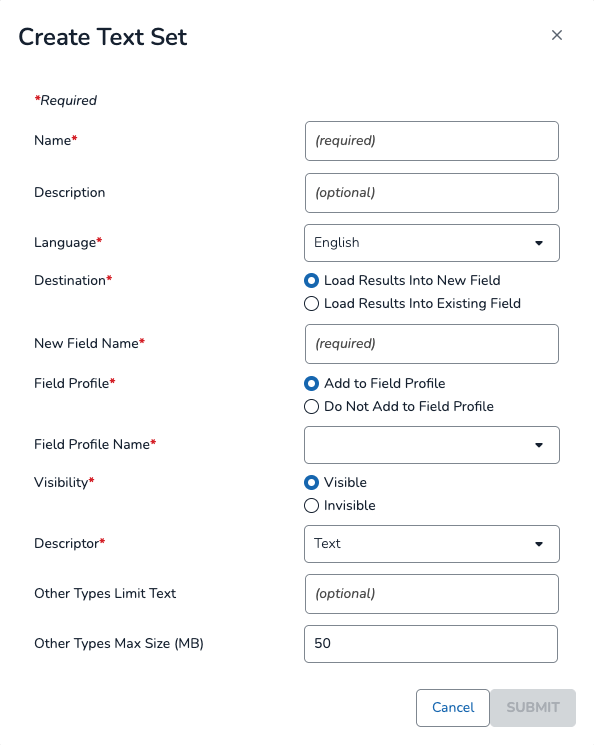
Name: Name the new text set.
Description: Describe the function of the text set.
Language: Choose a language for your text set.
Destination: Choose a location for your text set.
Load Results Into New Field – Create a new field for your text set.
New Field Name: Name your new field.
Field Profile: Choose whether or not to add the new field to an existing field profile
Add to Field Profile
Field Profile Name: Select a field profile from the dropdown.
Visibility: Choose whether or not the text set is visible or invisible. Invisible text sets can be populated with text but will not show up in Document Viewer.
Do Not Add to Field Profile
Load Results Into Existing Field – Use an existing field for your text set.
Existing Field: Select an existing field from the dropdown.
Descriptor: Identifies the kind of text in the set.
Text – Extracted or OCR text set (best for OCR jobs).
HTML – Native, coded text set (best for Translation jobs).
Transcribe – Audio / Visual Transcription text set (best for Transcription jobs).
Other Types Limit Text: List out file types that you want to create an index limit for. File types larger than the max size will not be indexed. Separate by semi-colons and include the dot when listing the file types, e.g.
.txt;.csv;.mp4Other Types Max Size: Type a max file size in megabytes to set your indexing limit.
Click SUBMIT to create the new text set.