Using routing rules to assign requests can help automate the process and eliminate the need for triaging every new request. But there are multiple existing features that also impact records request assignment:
Including locations in your agency.
Setting yourself to Out of Office (OOO).
Assigning another officer or admin as a delegate.
Having a fallback assignee for your agency.
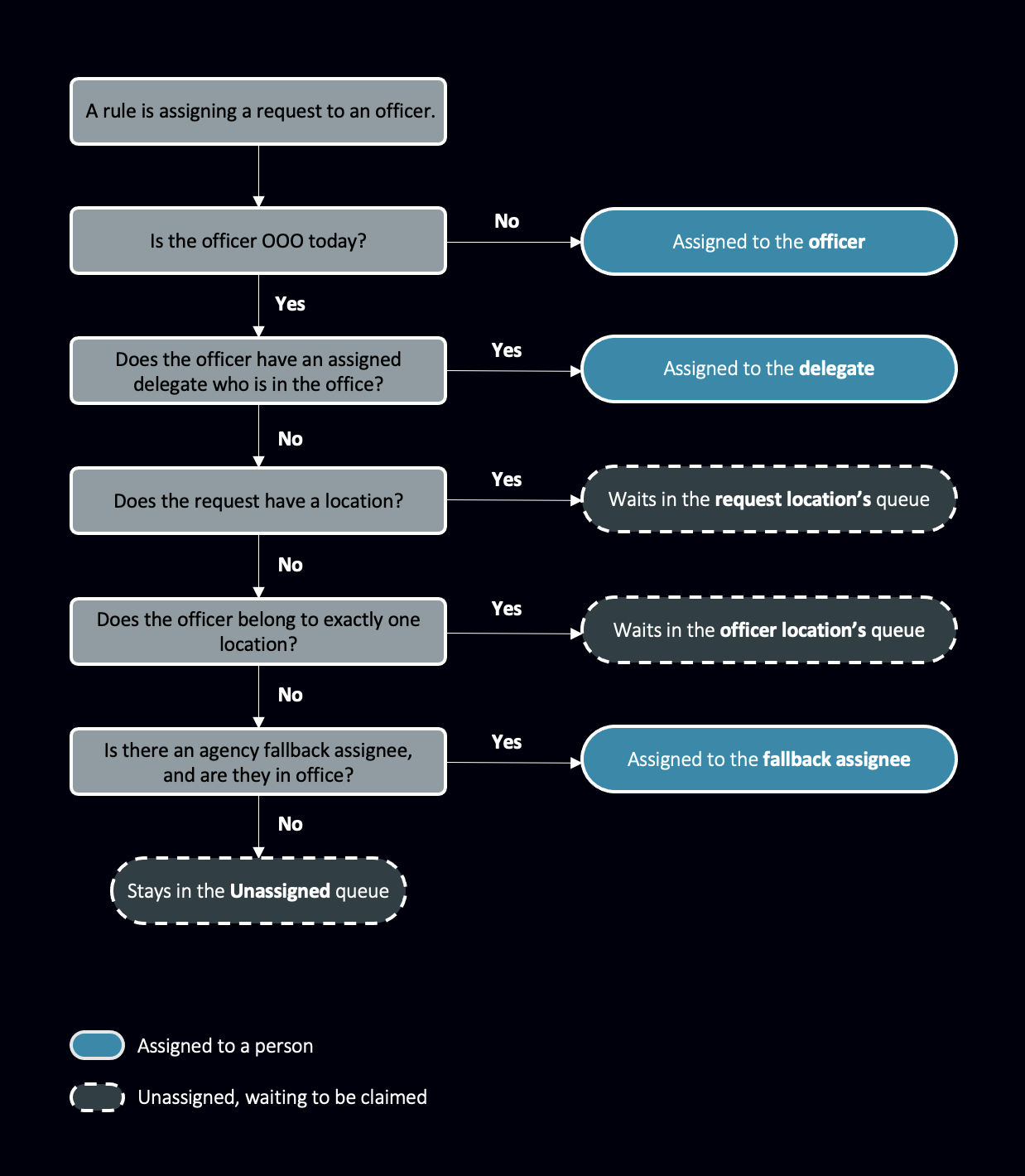
Request assignment flow chart
You can use the below flow chart to map where requests are assigned, which is especially useful for when you’re setting yourself to out of office.
Usually, requests are assigned to your delegate. But if you don’t have a delegate, or your delegate is out of office, then other factors like location and your agency’s fallback assignee will affect how the request is dealt with in the system. In short, all requests are either pushed to an active officer / admin, or pushed to a queue of requests that have yet to be claimed.
Additional resources
For more information on features that impact request assignment, see the articles below:
Profile Settings – For the Out of Office feature and delegate assignment.
Create Routing Rules – For instructions on how to create your own routing rules.
Members and Roles – For setting a fallback assignee.