View Redaction Audit log
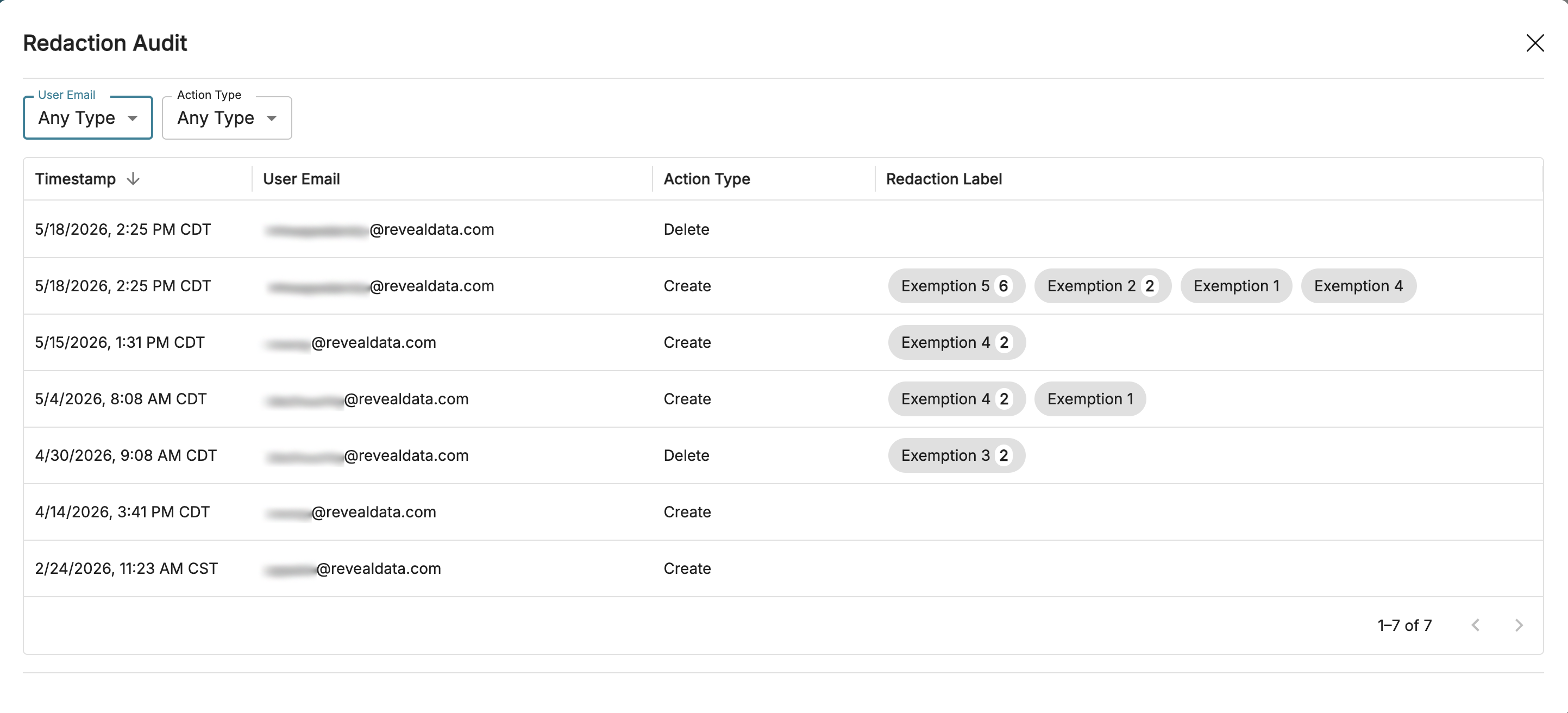
The Redaction Audit is a log of each created or deleted redaction performed in a single document. Redactions are organized newest to oldest by timestamp, but additional filtering can be set to organize by a user’s email or by action type (creating or deleting).
From the Document Viewer side panel, hover over the.png) ellipses icon and click View Redaction Audit to open the Redaction Audit log.
ellipses icon and click View Redaction Audit to open the Redaction Audit log.
Important
The redaction log will only update after a user saves their redactions.
Interpreting the Redaction Label column
The Redaction Label column displays which redaction labels were applied at the specific timestamp. A few important considerations when interpreting the log:
Redaction edits are not currently represented in this table.
Currently, this table can’t help you distinguish between a redaction with one label vs. a redaction with multiple labels. For example, the below entry could mean either 3 separate redactions (two Exemption 4, one Exemption 7), or 2 redactions (one Exemption 4, and one combined Exemption 4 & 7).

An empty value for the Redaction Label column means a redaction was created or deleted, but a label was not applied.
Bulk redactions are not represented in the Redaction Audit log.
Auto-redactions and redactions generated from the PII Auto-Redact toggle are represented in this log. This means, when a user enters a document and there are redactions automatically applied and saved, the log will reflect this and attach that user’s name to those log entries.
Note
The auto-redact toggle does not apply redaction labels, so the redaction label column will be blank for these redactions.