Please see the below table for examples of regex code, which can be copied and pasted directly into the Document Viewer search bar. Examples are offered with and without spaces.
Warning
Regex searches will not perfectly capture all PII (see the Regex limitations section for more information) It is still your responsibility to check the query, inspect your search results, and verify that nothing has been missed or falsely redacted.
The following resources, or similar resources, may help to understand and craft your own regex searches:
Try out your regular expressions against test strings using websites like regex101.
Search online regex databases for additional queries.
Regex limitations
Regex searches, including the references in this page’s table, are not exhaustive. Regex searches can still:
Return false positives
e.g. there is no way to tell regex to only highlight dates if they’re birthdays. Regex will hit any date that matches the code’s format.
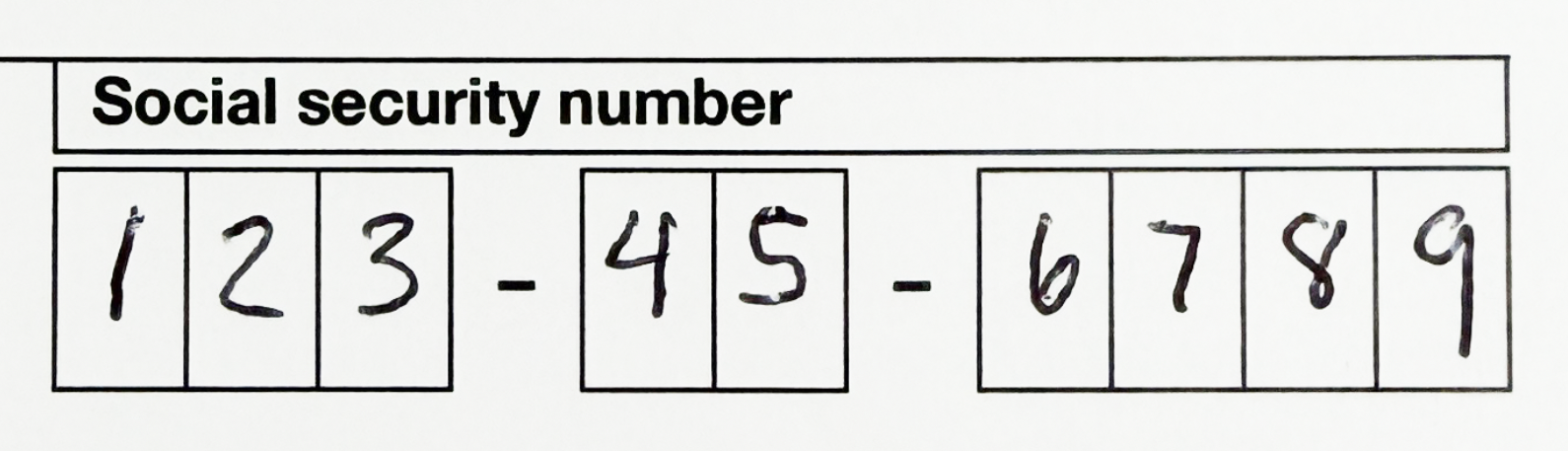
Miss a hit that does not have recognized text, is written, or is just an image
e.g.
Important
OCR is also imperfect, especially for written or low quality documents. If OCR were to mistakingly recognize the above SSN as 123-4S-6789, then an SSN regex search would not capture and redact this PII.
Miss a hit that is spelled or formatted incorrectly
e.g. an email without a period: “email@addresscom”
Miss a hit that contains unique characters not represented in the regex code
e.g. a Russian email address: “пользователь@example.com”
Note
If you’re searching for regex hits using Logikcull’s Document Viewer search bar, precede your search with
regex:. If you’re creating auto-redactions, only the code is needed.
Reference tables
Depending on how your regular expression is coded, you can perform either:
Broad regex searches
Captures more hits, but more likely to return false positives.
Specific regex searches
Captures less hits that are more specific, but more likely to miss hits.
Specific regex searches
The below table contains targeted searches, which may be preferred depending on project needs.
Important
Specific regex searches are more likely to miss hits. For example, BIN ranges (used to construct the below search queries) are controlled by card networks and can change, meaning regex searches are subject to becoming outdated over time.
Data Type | Code and Description | Example |
|---|---|---|
Email address |
Finds an email address composed of capital letters, lowercase letters, numbers, and/or the following symbols: . _ % + - | email@address.com %email+1@add-ress.net EMAIL@ADDRESS.ORG |
Credit Card – Visa |
Finds a string of 16 digits where the first digit must be a 4. The digits are at maximum spaced out in a 4, 4, 4, 4 format with or without delimiters. | 4xxx xxxx xxxx xxxx 4xxx-xxxx-xxxx-xxxx 4xxxxxxxxxxxxxxx |
Credit Card – MasterCard |
Finds a string of 16 digits, where the first two digits can be 51-55. The digits are at maximum spaced out in a 4, 4, 4, 4 format with or without delimiters. | 51xx xxxx xxxx xxxx 52xx-xxxx-xxxx-xxxx 55xxxxxxxxxxxxxx |
Credit Card – American Express |
Finds a string of 15 digits where the first two digits are 34 or 37. The digits are at maximum spaced out in a 4, 6, 5 format with or without delimiters. | 34xx xxxxxx xxxxx 37xx-xxxxxx-xxxxx 37xxxxxxxxxxxxx |
Credit Card – Discover |
Finds a string of 16 digits where the first 4 digits are 6011, 6221–6229, 644x–649x, or 65xx. The digits are at maximum spaced out in a 4, 4, 4, 4 format with or without delimiters. | 6011 xxxx xxxx xxxx 65xx-xxxx-xxxx-xxxx 647xxxxxxxxxxxxx |
Credit Card – Diners Club |
Finds a string of 14 digits where the first 3 digits can be 300–305, 36x, or 38x. The digits are at maximum spaced out in a 4, 6, 4 format with or without delimiters. | 302x xxxxxx xxxx 36xx-xxxxxx-xxxx 38xxxxxxxxxxxx |
Credit Card – JCB (16 digits) |
Finds a string of 16 digits where the first 4 digits could be 3528–3589. The digits are at maximum spaced out in a 4, 4, 4, 4 format with or without delimiters. | 3528 xxxx xxxx xxxx 3528-xxxx-xxxx-xxxx 3589xxxxxxxxxxxx |
Broad regex searches
The below table contains broader, less limited searches that capture a wider variety of hits.
Data Type | Code and Description | Example Variations |
|---|---|---|
Social security number (SSN) |
Finds any string of 9 numbers, at maximum spaced out in a 3, 2, 4 format with or without delimiters. | 123 45 6789 123-45-6789 123 - 45 - 6789 123 – 45 – 6789 123–45–6789 123456789 |
Phone number (US) |
Finds any string of 10 numbers, at maximum spaced out in a 3, 3, 4 format with or without delimiters. Parentheses may or may not be included around the first 3 numbers. | (123) 456 7890 123-456-7890 (123) - 456 - 7890 123 – 456 – 7890 123–456–7890 123.456.7890 (123)4567890 (123) 456 - 7890 |
Email address |
Finds any string of characters that include an @ symbol followed at some point by a “ . ” symbol. There is no limit to how many characters can be before or after the @ symbol, but at least one character must be present on either side. | xxx@xxx.xxx |
16-digit credit card number |
Finds any string of 16 digits, at maximum spaced out in a 4, 4, 4, 4 format with or without delimiters. | 1234 1234 1234 1234 1234-1234-1234-1234 1234 - 1234 - 1234 - 1234 1234 – 1234 – 1234 – 1234 1234–1234–1234–1234 1234123412341234 |
15- and 14-digit credit card numbers |
Finds any string of 14 or 15 digits, at maximum spaced out in a 4, 6, 5 or 4, 6, 4 format with or without delimiters. | 1234 123456 12345 1234-123456-12345 1234 - 123456 - 12345 1234 – 123456 – 12345 1234–123456–12345 123412345612345 |
Dates |
Finds any string of 3 numbers separated by a space or a delimiter. Days and months can be written with 1 or 2 digits, and years can be written with 2 or 4 digits. | 30 01 2026 30-1-2026 30 - 1 - 2026 1 – 30 – 2026 1–30–2026 1.30.26 01/30/26 |