Updates in feature releases, product improvements, and bug fixes.
Close request message
When closing a request, officers now have a space to write a closing message and choose whether to notify the requester via email. The closing message and closure reason are saved to the request's communication log, shown to the requester in their view of the request, and included in the closure email sent to the requester.
.png)
Learn more: View Request Details
Decline reason templates
Under Message Presets, admins can create multiple decline reason templates for common reasons, such as no responsive records or a duplicate request. When declining a request, officers choose a template that fills in the message, which they can edit further before sending.
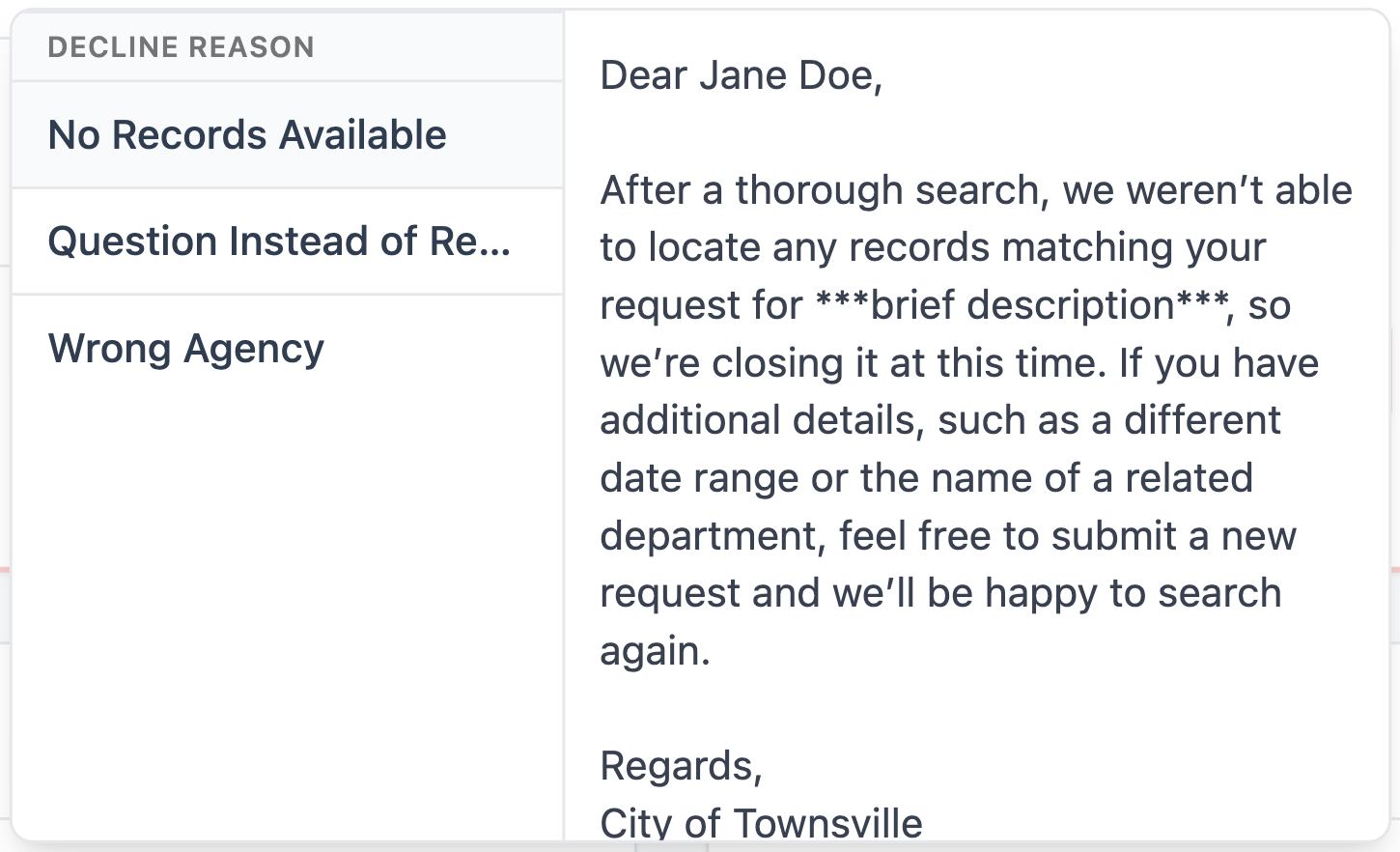
Learn more: Message Presets
Translated email templates
Email templates now come translated into Dutch and UK English, alongside US English, so you no longer need to translate them by hand. Admins can set a default template language for their agency, and the template editor opens in that language. Requesters receive emails in their own language when it’s known, and in the agency’s default language otherwise.

You can still customize each template for each language, and if a translation is missing, the agency default is used.
Learn more: Email Templates
Improved sharing of requests
Requests are now easier to share with other members. You can either instantly copy the request link using the  link icon, or you can create and send a download summary, which exports a PDF that contains request details (requester, status, deadlines, assigned agent, etc.) and a communication log of all sent messages.

Download summaries can also be made with or without internal notes. If a download summary contains notes, a red warning will be present on the top of each page, alerting members that the document should not be shared outside the agency.
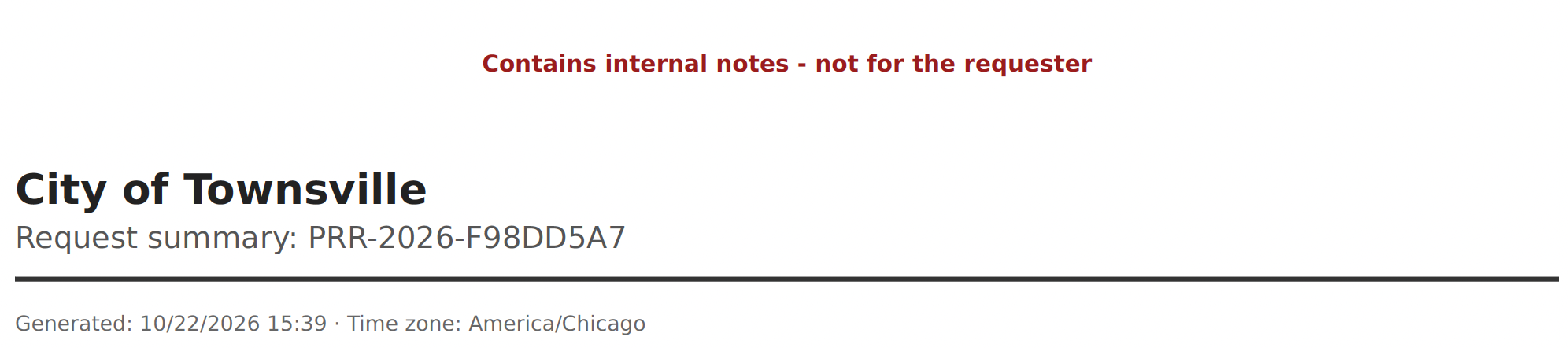
Download summaries without internal notes can be helpful to export and share with requesters for proof of filing, appeals/disputes, or other occasions where evidence or records of the request are needed.
Learn more: View Request Details
Other fixes and tweaks
Ticket ID | Title | Description | Fix Date (bugs only) |
|---|---|---|---|
FP-614 | Resizable document list (Reading Room) | In the Reading Room, the document list is narrower by default so open documents get more space. Drag the divider between the list and the viewer to resize them. Your chosen width is kept for the rest of your session. | |
FP-575 | Name labels for improved messaging | When communicating with requestors through the Agency Portal's Messages tab, received messages show the requestor's name, and sent messages show the agent's name who sent the message. | |
FP-571 | Attach files to internal notes | Files can now be added to internal notes, either through drag-and-drop or by browsing files. Attachments are only viewable by agents with access to the request. They're never available to requesters or visible in the Reading Room. | |
FP-567 | Member role permissions table | The Members tab now has a button that opens up an in-app permissions table detailing what actions can be performed by each role – Admins, Officers, and Viewers. The table can be accessed by clicking “What can each role do?” at the top of the screen. | |
FP-566 | Status Reports include labels | The Workflow Status report now includes a Labels column, which is also exported when creating a CSV or PDF of the report. You can also filter any of the 6 status reports down to isolate requests of a specific label. | |
FP-565 | Create labels directly from a request | Admins can now create new labels directly from a request's Classification panel. Admins can also give Officers permission to create labels through the Classification panel in Settings > Labels. | |
FP-564 | Exact date and time on internal notes | Internal notes now show the exact date and time they were added in your agency's time zone. This also applies to a note's edit history. | |
FP-556 | Request form document upload configuration | In the Request Form Builder, Admins can now configure whether or not requestors can upload supporting documents including the max size per file, the max total size of all files, and the max total number of files. | |
FP-553 | Improved Dashboard searching and filtering | The Dashboard's searching and filtering capabilities have improved, including the ability to use the search bar to perform keyword searches on the request title (Public Name) and requester name, rather than just the tracking ID. | |
FP-552 | Standing Publications categories | Admins can set up information categories in settings, then rename, reorder, or deactivate them as needed. Each new Standing Publication must be assigned a category, which staff can change later. | |
FP-551 | Standing publications start in Agency Review | Standing Publications now start directly in the Agency Review stage, skipping the Accept step. | |
FP-550 | New Request dropdown | The New Request button has been converted to a dropdown, where agents can select between Records Request and Standing Publications. Previously, the Records Request / Standing Publications was a toggle at the top of the New Request popup. | |
FP-548 | Optional requester IP address logging | Logikcull for Public Records can now track requester IP addresses, which help identify submissions created by bots or by requestors who claim to be local, but aren’t. IP address tracking is off by default, and users must contact Reveal in order to turn this feature on. | |
FP-534 | Uploaded documents available in the Reading Room | Documents that officers upload directly can now be released to the public in the Reading Room, just like Logikcull productions. Only approved, public documents appear, and documents that are withdrawn or made private are removed. | |
FP-557 | Accurate attachment size limits | Fixed the upload document areas in Messages and Records to accurately display file size upload limits. | 10-15-2026 |
FP-554 | Holiday list updates after changing jurisdiction | Fixed an issue where changing the jurisdiction in the Deadlines & Holidays tab and clicking "save" didn't update the holiday list until the page was refreshed. Now, the list updates right away, and deadlines use the new holidays as soon as you save. | 10-1-2026 |