Updates in feature releases, product improvements, and bug fixes.
Improved Custom fields
Improvements to custom fields now offer wider options for custom field customization, supporting a greater variety of workflows.
Expanded custom field types
An expanded set of field types lets you further customize the fields you use in sorting and review, and offers greater options for field value filename generation when producing documents.
Short text – A text box capped at 255 characters.
Long text – A multi-line text box capped at 10,000 characters.
Single-select dropdown – A dropdown of custom values, limited to one selection only.
Multi-select dropdown – A dropdown of custom values that lets you select one or more options.
Date – A date field.
Hyperlink – A field to store URLs, useful for attaching reference documents or records requests to data directly.
Fields created before the Custom Field Type update will convert to either short text fields or long text fields if the field’s content is greater than 255 characters or contains an actual line break (e.g., pressing the “enter” key).
Learn more: Manage Custom Fields
Required fields
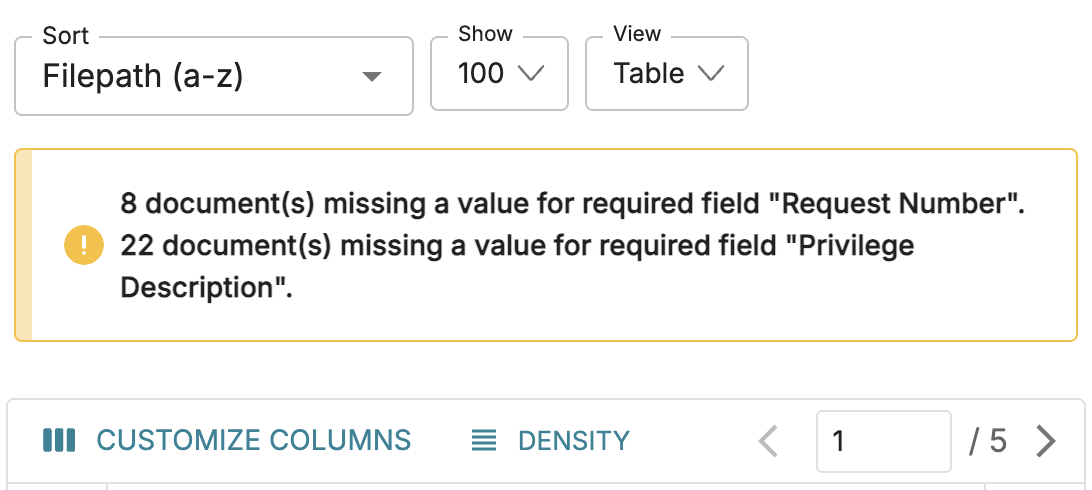
Fields can now be marked as required, which will add a red asterisk to the field name inside the Document Viewer. Additionally, Logikcull will present various alerts to users throughout the platform, notifying them that reviewed documents have required fields without any values.
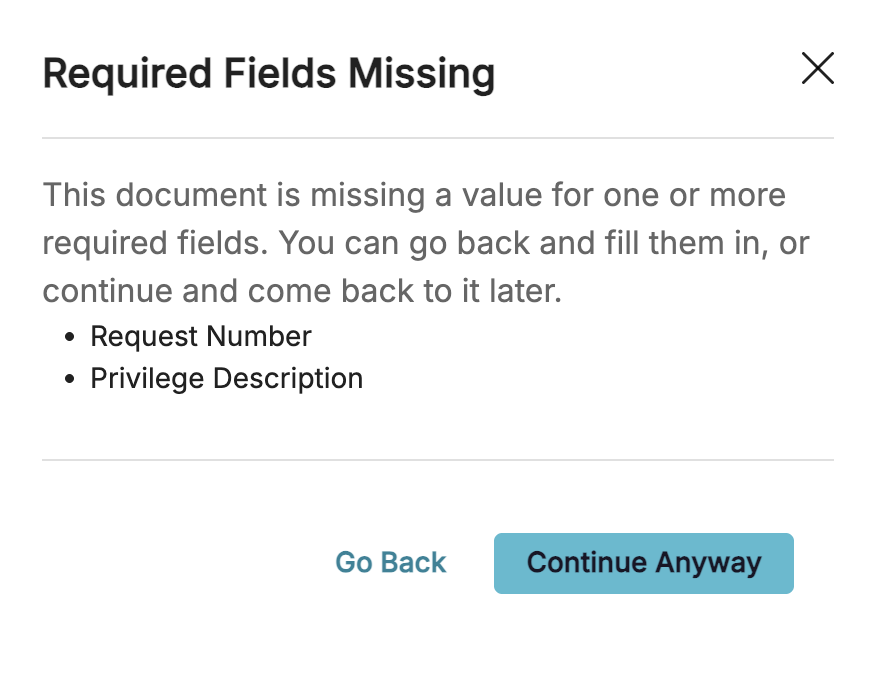
If a reviewer wants to continue on to the next document without filling out required fields, a popup will appear, but users can continue anyway and leave those fields blank. In the Search screen, a warning is also visible above the Table View, notifying users of the number of documents with empty required fields.
Learn more: Manage Custom Fields
Withhold fully redacted pages
Fully redacted pages can now be removed entirely from your productions. Pages are considered “fully redacted” by Logikcull if they’ve been redacted in Document Viewer using the  Redact Current Page or
 Redact Multiple Pages buttons.
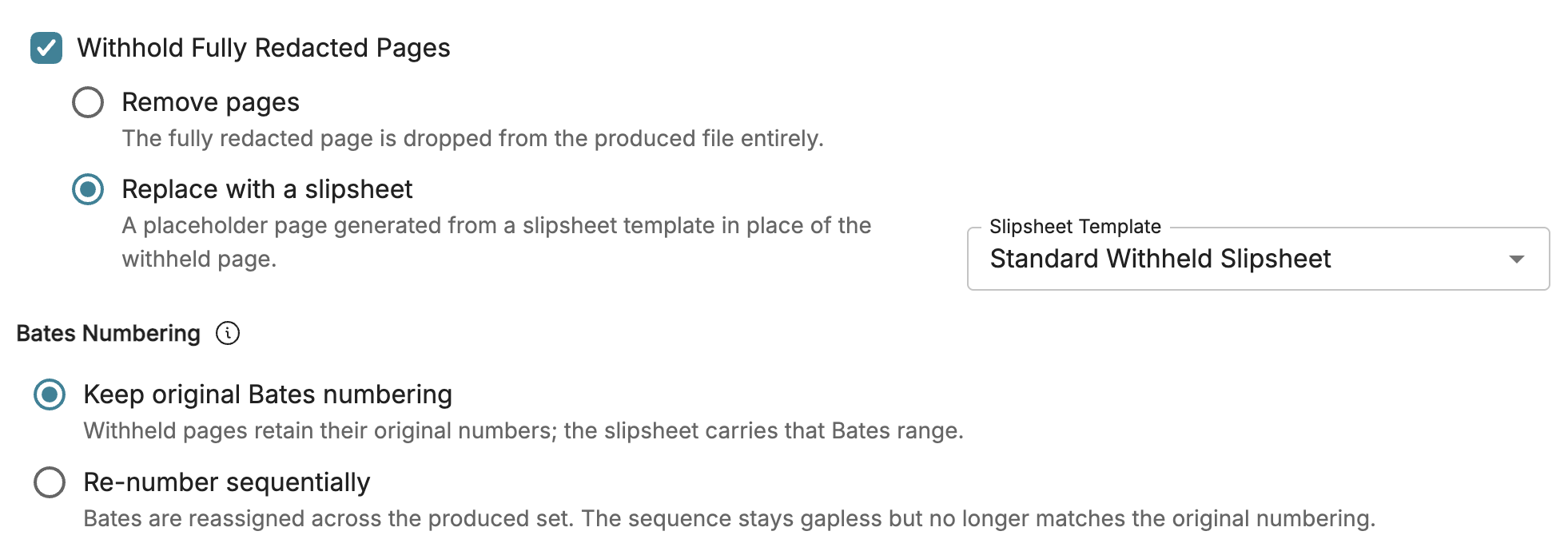
You can also choose whether or not the pages are just removed, or if they’re removed and replaced by a slipsheet. The slipsheet lists the page(s) removed, Bates numbers, and the reason for exemption.
.png)
Learn more: Download Productions
Other fixes and tweaks
Ticket ID | Title | Description | Fix Date (bugs only) |
|---|---|---|---|
CREEP-12548 | PII toggle adds Auto-Redactions Triggered tag | The PII (Personally Identifiable Information) toggle now add the “Auto-Redactions Triggered” tag to a document, just like redactions created by the Auto-Redactions table. | |
CREEP-12463 | Auto-redaction rules without redaction labels | Auto-redaction rules can now be created and run without choosing a redaction label. Redactions from these rules behave like any other unlabeled redaction, and you can add a label later during review. | |
CREEP-12430 | Deletion blocked during active downloads | Projects and uploads can no longer be deleted while a download that uses them is still in progress. A message explains why the deletion was blocked, and you can delete normally once the download finishes. | |
CREEP-12429 | InstantReview recipients receive notifications | Recipients of files shared through InstantReview now receive a primary notification when the share starts, then a second notification once the data is ready, which includes a download link. | |
CREEP-12350 | Improved redactions filtering in Document Viewer | The Redactions section of the Document Viewer side panel now lists each redaction individually, with its page and label. Clicking any of the listed redactions jumps straight to it. You can also filter redactions by one or more labels and see how many redactions use each label. When a filter is on, the next and previous buttons move only between redactions with the selected labels. | |
CREEP-12348 | Improved redaction editing in Document Viewer | Improved how the PDF viewer tracks your place while reviewing redactions. The viewer now keeps your place when editing a redaction's label, color, justification, position, or deleting a different redaction elsewhere on the page instead of resetting your place. | |
CREEP-12302 | Project Templates save redaction preferences | Project Templates now save your Auto-Redaction rules and Redaction Exclusion lists. | |
CREEP-12094 | Improved redaction label searching within table | The search bar above the Redaction Labels table now searches for content by both the Description column and the Source column. | |
CREEP-11926 | Edit and delete redaction exclusions | You can now edit and delete redaction exclusions in addition to enabling or disabling them. | |
CREEP-10194 | Changed Logikcull Learning link in Search FAQ | Updated the Logikcull Learning URL to point to the Logikcull Catalog page. | |
LOGPROC-4336 | Plain text email rendering issue | Emails whose HTML body is plain text with no formatting now render to PDF correctly. Before, these emails failed to produce a PDF. | 10-13-2026 |
LOGPROC-4327 | Increased timeout for large uploads | Increased the timeout length to prevent large uploads from failing in projects that have Ask enabled. | 10-13-2026 |
CREEP-12688 | Fields renamed in load templates don't save | Resolved an issue where fields renamed in load file templates through the Download popup wouldn't save and revert to the original name. | 10-26-2026 |
CREEP-12612 | Custom field text length issue | Fixed an issue where existing custom fields holding more than 255 characters were cut off or could not be saved after custom fields was introduced. Now, those fields are long text fields and have the long text character limit instead of 255 characters. | 10-16-2026 |
CREEP-12511 | Legal Hold Custodian Report error | Resolved an issue where the Legal Hold Custodian Report window showed an error when opened or when its dates were changed. | 9-24-2026 |
CREEP-12408 | Corrected expiration date shown in ShareSafe emails | Fixed an issue where ShareSafe invitation emails showed the link expiring in “0 Days” without including a date. (The link itself still worked, it was just the text that was incorrect.) | 10-1-2026 |
CREEP-12311 | Project Admins setting project stages and assignees | Fixed an issue where setting a project's stage or assignee was restricted to Account Admins only. Project Admins can now set or change project stage and assignees on any of their projects. | 9-14-2026 |